Making a YouTube channel takes about five minutes. Making one that is ready to grow takes a little longer. The difference is in the setup steps most people skip: securing the account, choosing a handle that works, writing a description that tells YouTube what the channel is about, and understanding the monetisation thresholds before you upload a single video. This guide walks through the creation process, the customisation that matters, the security step that is non-negotiable, and the realistic path to earning from your channel in 2026.
Create the Channel Itself
You need a Google account to start. If you already have one, you do not need a new one. You can create a separate YouTube channel alongside your personal account, which keeps your viewing and commenting activity private while giving you a public presence for uploads .
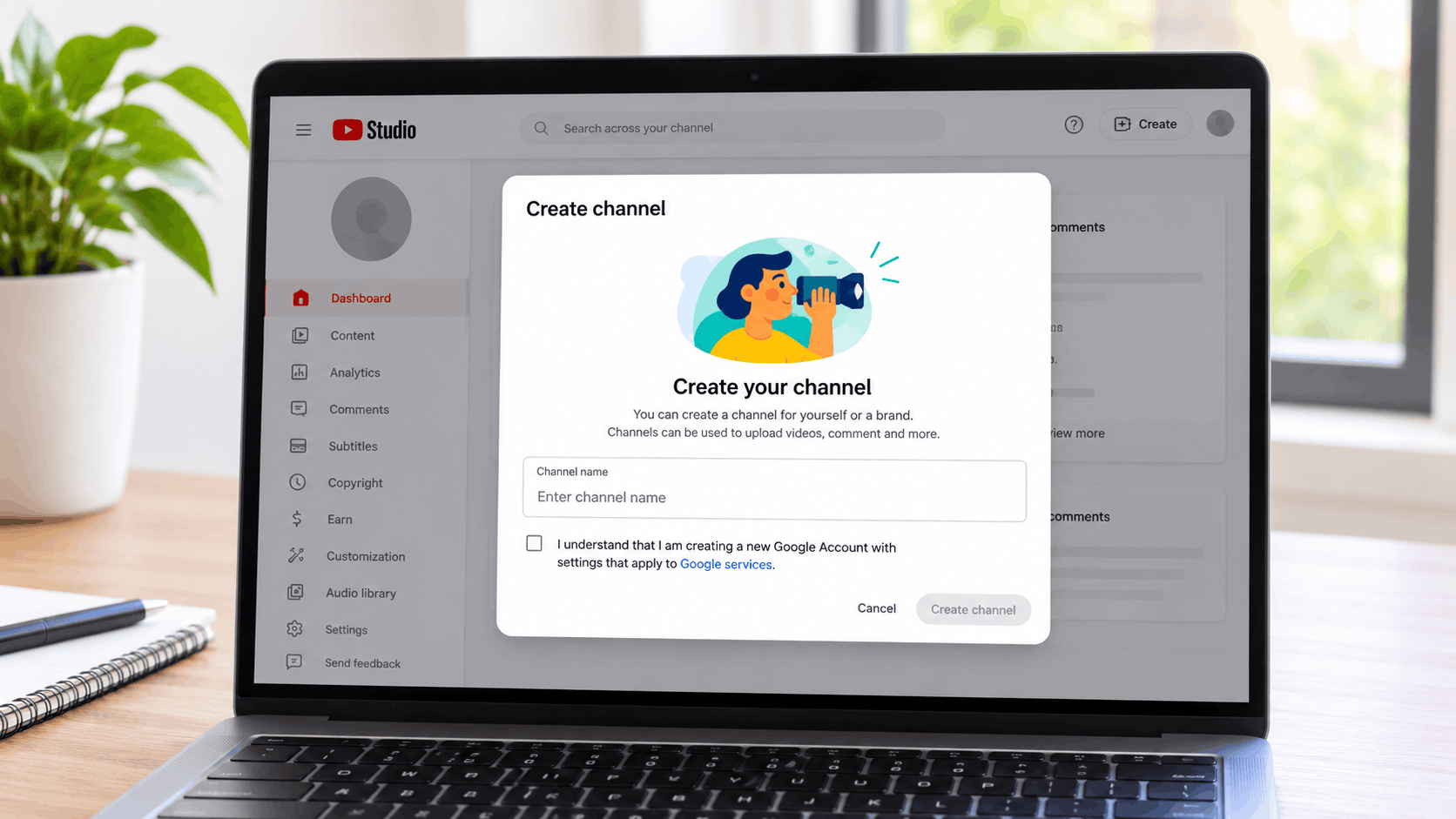
The steps are straightforward. Sign in to YouTube, click your profile picture, and go to Settings. In the Account section, select Add or manage channel(s), then click Create a channel . You will be asked to choose a profile picture, a name, and a handle. Click Create channel and it is done.
If you want a channel that more than one person can manage, for example for a business or a collaborative project, you can create it through a Brand Account instead. The process is similar, but the channel is tied to a Brand Account rather than your personal Google account, which allows multiple owners and managers .
Choose a Handle That Will Last
Your handle is the short identifier that starts with an @ symbol, like @yourname. It is distinct from your channel name, and it becomes your channel’s URL: youtube.com/@yourhandle .
Handles must be between 3 and 30 characters, can use letters, numbers, underscores, hyphens, full stops and middle dots, and must follow YouTube’s Community Guidelines. They are not case-sensitive, and YouTube does not allow the sale or transfer of handles .
The practical advice is to choose something short, easy to type, and clearly connected to your channel’s topic or your own name. If your channel is about your personality, use your name. If it is about a subject, use a descriptive term that people might search for. You can change it later, but consistency from the start saves confusion.
Customise the Channel Page
Once the channel exists, go to YouTube Studio and click Customization in the left sidebar. This is where you add the elements that make the channel look like a real channel rather than an empty shell .
Profile picture. This is the image that appears next to your videos and comments. If you are comfortable on camera, a clear photo of your face builds connection and tends to perform better. If not, use a simple, high-contrast logo that reads clearly at small sizes on mobile .
Banner image. The banner sits at the top of your channel page. It should say briefly what the channel is about and, if you have one, your upload schedule. A simple call to action like “Subscribe for weekly tips” works. YouTube recommends uploading a banner of at least 2048 x 1152 pixels with a 16:9 aspect ratio .
Channel description. This is where you tell both viewers and YouTube what to expect. Answer three questions: what will you make, who is it for, and what can viewers expect if they stick around? Use natural language that includes phrases people might actually search for, rather than keyword stuffing .
Channel keywords. In YouTube Studio, go to Settings → Channel → Basic info and add 5 to 10 keywords that describe your channel’s focus. These are not visible to most viewers, but they help signal to the algorithm what your videos are about .
Secure the Account Before You Upload Anything
This step is not optional. Turn on two-step verification for your Google account before you invest any time in the channel. Go to your Google account security settings and enable 2-Step Verification. An authenticator app is more secure than SMS .
The reason is simple. A compromised Google account means a compromised channel. Recovering a stolen channel is difficult, and the damage to your audience and your work can be permanent. The few minutes it takes to set up two-step verification are worth more than any editing software you will buy.
Understand the Verification Tiers
YouTube restricts some features behind verification steps. There are three tiers, and the one you need depends on what you want to do .
Standard features allow video uploads, playlist creation and editing. These are usually enabled by default as long as your channel has no active Community Guidelines strikes.
Intermediate features allow uploads longer than 15 minutes, live streaming, and custom thumbnails. To get these, you need standard features plus phone verification.
Advanced features allow you to apply for monetisation, add external links to video descriptions, A/B test titles and thumbnails, and submit appeals for Content ID claims. You need intermediate features plus either video verification, ID submission, or about two months of channel history .
If you are serious about the channel, aim for advanced features early. The requirements are easy to meet and they unlock the tools you will need later.
The Monetisation Thresholds in 2026
The rules for earning money from YouTube changed significantly in 2026, and it is worth knowing the numbers before you plan your content strategy.
To join the YouTube Partner Programme (YPP) and earn from ads, you need either 1,000 subscribers with 4,000 qualified watch hours in the past 12 months, or 1,000 subscribers with 10 million qualified Shorts views in the past 90 days . These are the thresholds currently in force.
However, from 1 February 2027, YouTube is introducing updates to the YPP, and creators will need to review and accept the updated terms by 31 January 2027 to continue fully monetising . Reporting in August 2026 indicated that new creators would face a higher bar of 8,000 watch hours or 20 million Shorts views, though creators already in the programme would not be affected . If you are starting now, it is worth planning for the possibility that the entry requirements will be higher by the time you are eligible.
There is also an earlier access route. Creators with 500 subscribers, three public uploads in the last 90 days, and either 3,000 watch hours or 3 million Shorts views can join the YPP at a reduced level. This does not include ad revenue, but it does unlock fan funding features such as channel memberships, Super Thanks and YouTube Shopping .
Plan Your First Videos Before You Record
The most common mistake new creators make is uploading whatever they happen to film first. A better approach is to plan a small set of ideas before you start.
For each idea, write down who the video is for, what they will get from watching it, and what makes your angle useful or interesting . Then look at videos that are performing unusually well for channels in a similar space. These outliers can show you what topics, titles and thumbnails are connecting with viewers. Do not copy them. Ask what problem they address and how you can address it in your own way .
For your first video, pick the strongest idea. You do not need professional equipment. A phone is enough if viewers can clearly see, hear and understand what you are showing them. Focus on a strong opening that names the problem and shows what the viewer will get, clear audio, and usable lighting .
Frequently Asked Questions
How long does it take to make a YouTube channel?
Creating the channel itself takes a few minutes. Customising the profile picture, banner, description and keywords, and setting up two-step verification, takes about 10 to 20 minutes in total . Filming and editing your first video takes longer and depends on the content.
Do I need a new Google account to make a YouTube channel?
No. You can create a YouTube channel alongside your existing Google account. This keeps your personal viewing and commenting activity separate from your public channel presence . You only need a new Google account if you want a completely separate identity for the channel, which is not necessary for most people.
How many subscribers do you need to make money on YouTube?
To earn from ads through the YouTube Partner Programme, you need 1,000 subscribers and either 4,000 qualified watch hours in the past 12 months or 10 million qualified Shorts views in the past 90 days . There is an earlier access route at 500 subscribers that unlocks fan funding features but not ad revenue .
What should I name my YouTube channel?
Choose a name that fits the channel’s focus. Use your own name if you plan to be the on-screen personality, or a descriptive name tied to your topic if the channel is about a subject. You can change it later, so do not let the decision delay you . The handle, which is separate, must be between 3 and 30 characters and unique .