Picking a restaurant pos system comes down to whether it actually fits how your venue runs service, not which one has the lowest headline price. A table-service restaurant needs table plans, course timing and split bills handled properly. A quick-service or takeaway venue cares more about kitchen display speed and delivery platform integration. Both need to handle tips correctly under the 2023 tipping rules and flag allergens without slowing staff down.
This guide compares restaurant pos systems on exactly those features, not on monthly cost, since pricing changes often and depends heavily on your specific setup. If you want the general pricing comparison across UK providers, that lives on our POS system hub page. Here, we’re working through what actually matters once the system is running your Friday night service.
What to Look For in a Restaurant POS System (Beyond Price)
Restaurant point sale systems differ from generic retail tills in a few important ways. They need to track a table or tab through multiple courses rather than a single transaction, route orders to the right kitchen station automatically, and handle modifiers (no onions, extra sauce, allergy notes) without confusing the kitchen. A system built primarily for shops will struggle with all of this, even if it technically “does hospitality” as an add-on.
Before comparing specific features, it’s worth being honest about which type of venue you’re running, since the priorities differ sharply. A table-service restaurant lives or dies on course timing, table management and a smooth split-bill experience. A quick-service or delivery-heavy operation cares far more about kitchen ticket speed and how cleanly delivery platforms feed into that same kitchen queue. Most systems can serve both, but they’re rarely equally strong at each.
Table Plans and Course Timing for Table-Service Venues
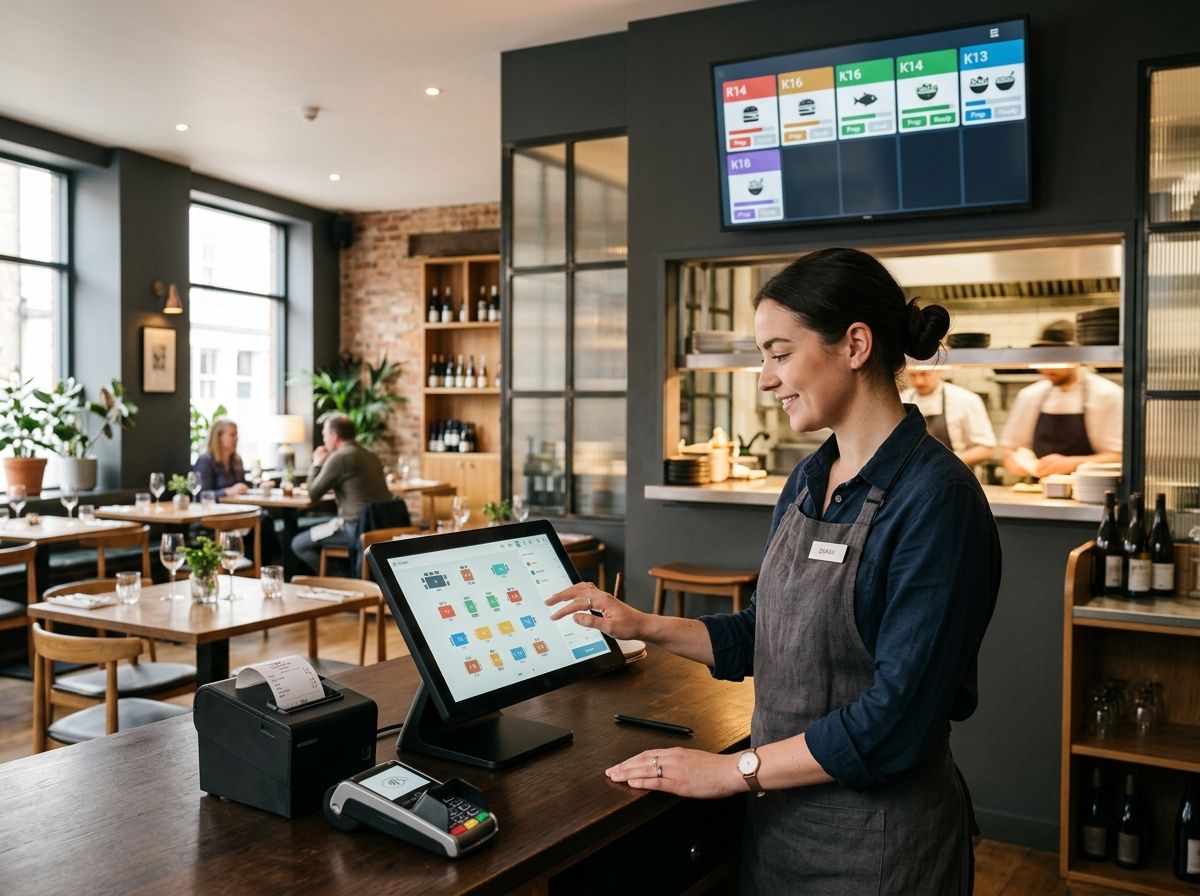
A digital table plan lets front-of-house staff see which tables are occupied, which are cleared and ready, and which are approaching the end of their booking window, all from one screen rather than a paper chart pinned by the host stand. Better systems let you customise the floor plan to match your actual room layout, including different sections for different service periods.
Course timing (sometimes called course firing or coursing) controls when each part of an order gets sent to the kitchen. Rather than sending starters and mains together, a good pos restaurant system holds back the main course ticket until staff confirm the table’s starters have gone out, or fires it automatically after a set interval. This matters more than it sounds. Getting course timing wrong is one of the more common causes of a table receiving their main course while they’re still finishing a starter, which is avoidable with the right software configuration rather than staff simply trying to remember every table’s pace.
For venues running tasting menus or set courses with precise timing, look specifically for manual course-hold controls that let a server delay firing until they’re ready, rather than relying purely on a fixed timer.
Kitchen Display Screens: Speeding Up Pos Restaurant Systems in the Back of House
A kitchen display system (KDS) replaces printed dockets with a screen in the kitchen showing incoming orders, grouped by station and colour-coded by how long they’ve been waiting. This matters for two reasons: it cuts down on lost or illegible paper tickets, and it gives kitchen staff a clear view of what’s overdue during a busy service.
Good kitchen display setups let you route different items to different stations automatically, so a starter ticket appears at the cold section while the main course ticket appears at the grill, both linked to the same table so timing can be coordinated. Most modern systems also support “bump” functionality, where a chef marks an item as complete with a tap, removing it from the active queue and logging preparation time for later reporting.
If you’re comparing systems, ask specifically how orders from delivery platforms appear on the kitchen display alongside dine-in and walk-in orders. A system that shows everything on one unified screen avoids the common problem of staff juggling a separate tablet for each delivery app plus the till itself.
Split Bills and Table-Side Payment
Splitting a bill sounds simple until you’re doing it for a table of eight who each want something slightly different divided. A capable restaurant point of sale system should support splitting evenly across a set number of guests, splitting by specific items ordered, and splitting by seat number for venues that assign orders to individual diners rather than the table as a whole.
Table-side payment, taking a card machine to the table rather than asking guests to come to a till, has become standard in most UK restaurants and cuts down on both walkout risk and the time staff spend running back and forth. The card machine should link directly to the till so a split payment updates the same bill in real time, rather than requiring a separate manual reconciliation at the end of the night.
Tips and Service Charges: What the 2023 Tipping Rules Mean for Your Till
The Employment (Allocation of Tips) Act 2023 came into force on 1 October 2024 and applies across England, Wales and Scotland (Northern Ireland isn’t currently covered). Under the Act, employers must pass on qualifying tips, gratuities and service charges to workers in full, without deductions beyond what’s legally required (tax and National Insurance), and allocate them in a fair and transparent way. Tips must be distributed to staff no later than the end of the month following the month they were received, according to guidance from Charles Russell Speechlys.
This has direct implications for how your restaurant pos system needs to be configured. The till needs to record tips and service charges separately from the core sale, keep an accurate running record of how each tip is allocated (the law requires this record be kept for three years), and support whatever allocation method you use, whether that’s an even split, a points-based system weighted by hours worked, or role-based weighting between front and back of house.
If your venue receives tips “more than occasionally,” a written tipping policy is expected under the accompanying statutory Code of Practice. Most modern EPOS systems can generate the reporting you need to support that policy, but the policy itself still needs to be written and communicated separately from whatever the software produces automatically.
How Service Charge Distribution Is Configured on Your Till
Discretionary service charges (typically 10 to 12.5% added automatically to a bill, which the customer can ask to have removed) need to be tracked distinctly from tips left voluntarily by card or cash. Most restaurant EPOS systems let you configure a default service charge percentage that applies automatically to dine-in bills over a certain party size, while still allowing staff to remove or adjust it at a customer’s request without needing manager authorisation for a routine adjustment.
Behind the scenes, how that collected service charge then gets distributed to staff, whether through a tronc scheme, an even split, or a role-weighted formula, is a payroll and policy decision rather than something the till decides on its own. For a full breakdown of how discretionary service charges work and how tronc arrangements are typically structured, see our dedicated guide on discretionary service charges.
Allergen Flagging: Natasha’s Law and Your Menu
Natasha’s Law, introduced on 1 October 2021, requires pre-packed food for direct sale (PPDS), meaning food made and packaged on the same premises it’s sold from, to carry a full ingredients list with the 14 major allergens clearly highlighted, according to the Food Standards Agency’s allergen guidance. This applies to items like sandwiches wrapped in-house or cakes packaged at a counter, but most restaurant dishes served to order (plated meals, made-to-order food) fall outside PPDS since the customer orders before the food is prepared or packaged.
That said, non-prepacked food still carries a legal obligation: allergen information for the 14 major allergens (celery, cereals containing gluten, crustaceans, eggs, fish, lupin, milk, molluscs, mustard, peanuts, sesame, soybeans, sulphur dioxide and sulphites, and tree nuts) must be available to customers, whether given verbally by staff or in writing, under the Food Information Regulations 2014.
A restaurant pos system that supports allergen flagging properly should let you tag each menu item and modifier with the allergens it contains, so a server can pull up an accurate answer at the till rather than relying on memory during a busy service. Better systems flag a conflict automatically if a customer’s stated allergy matches an ingredient in an item they’ve ordered, prompting a check before the ticket goes to the kitchen. This isn’t a legal requirement in itself, but it meaningfully reduces the risk of a genuinely dangerous mistake reaching the kitchen unnoticed.
Delivery Platform Integrations: What Epos for Restaurants Needs to Handle
Deliveroo, Uber Eats and Just Eat between them account for a large share of UK restaurant orders, and running each on a separate tablet behind the counter is a common source of missed or duplicated orders during peak service. A properly integrated epos for restaurants setup pulls orders from all three platforms directly into the same kitchen queue as dine-in and walk-in orders, without needing a staff member to manually re-key anything.
The features worth checking specifically: whether stock updates automatically across platforms when an item sells out (to avoid taking an order for something you can no longer make), whether preparation times and delivery zones can be set per platform, and whether reporting consolidates sales across every channel into one view rather than requiring you to check three separate delivery dashboards alongside your till reports.
For venues running multiple virtual brands from one kitchen (sometimes called dark or ghost kitchens), look for a system that can manage several separate menus and pricing structures from the same back-of-house setup, routing each brand’s orders correctly without mixing up tickets.
Restaurant POS Systems UK: Quick-Service vs Table-Service Feature Priorities
Not every restaurant needs every feature covered above at the same intensity, and it’s worth being clear about which matters most for your specific venue before you start comparing providers.
- Table-service restaurants should prioritise: digital table plans, course-hold controls, split-bill flexibility by item and by seat, and table-side card payment.
- Quick-service and counter venues should prioritise: fast kitchen ticket routing, a clear kitchen display, and quick, low-friction card payment at the counter rather than table management.
- Delivery-heavy and dark kitchen operations should prioritise: multi-platform delivery integration, automatic stock sync across channels, and clean order consolidation into a single kitchen queue.
- Pubs and venues with a mixed food and drink offer typically need a blend: open tabs, quick-fire drink ordering, and enough table management to handle a Sunday lunch rush without the full complexity of a fine-dining table plan.
Most restaurant point of sale systems on the UK market can flex across more than one of these categories, but very few excel equally at all of them, so match your shortlist to the category that describes your venue most closely rather than the one with the longest feature list.
FAQs
What features does a restaurant POS system need?
A restaurant POS system needs table management, course timing, split-bill support, a kitchen display system, and integration with delivery platforms like Deliveroo, Uber Eats and Just Eat. It should also handle tip and service charge tracking correctly under the 2023 tipping rules and support allergen flagging for menu items.
What’s the difference between a restaurant POS system and a retail POS system?
A restaurant POS system tracks orders through multiple courses tied to a table or tab, routes tickets to specific kitchen stations, and manages tips and service charges. A retail POS system focuses instead on barcode scanning, SKU tracking and stock control, which restaurant systems generally handle in a lighter, less detailed way.
Do restaurant EPOS systems integrate with Deliveroo, Uber Eats and Just Eat?
Yes, most modern restaurant EPOS systems in the UK integrate directly with these delivery platforms, pulling orders into the same kitchen queue as dine-in orders. This avoids the need for separate tablets per platform and reduces manual re-entry errors during busy periods.
How do the 2023 tipping rules affect my restaurant’s POS system?
Under the Employment (Allocation of Tips) Act 2023, in force since 1 October 2024, employers must pass on tips in full and allocate them fairly, with a running record kept for three years. Your POS system needs to record tips and service charges separately from core sales and support whatever fair allocation method your written tipping policy sets out.
What is a kitchen display system (KDS)?
A kitchen display system replaces printed paper tickets with a screen in the kitchen showing incoming orders, grouped by station and often colour-coded by how long they’ve been waiting. It reduces lost tickets and gives kitchen staff a clearer view of what needs attention first during service.
Do I need to show allergen information on my restaurant menu?
Yes, UK food businesses must make information on the 14 major allergens available for every dish, either verbally through trained staff or in writing, under the Food Information Regulations 2014. Pre-packed food made and packaged on-site (PPDS) has stricter labelling requirements under Natasha’s Law, though most made-to-order restaurant dishes fall outside that specific rule.
Can a restaurant POS system handle split bills?
Yes, most systems built for hospitality allow bills to be split evenly across guests, split by specific items ordered, or split by seat number. Check this specifically during a demo if your venue regularly serves larger tables, since split-bill handling varies more between providers than it might appear on a features list.
How is service charge distribution configured on a restaurant till?
Most tills let you set a default discretionary service charge percentage that applies automatically to bills over a certain party size, while still allowing staff to adjust or remove it on request. How the collected service charge is then distributed to staff, whether through a tronc scheme or another method, is a separate payroll decision the till doesn’t make on its own.