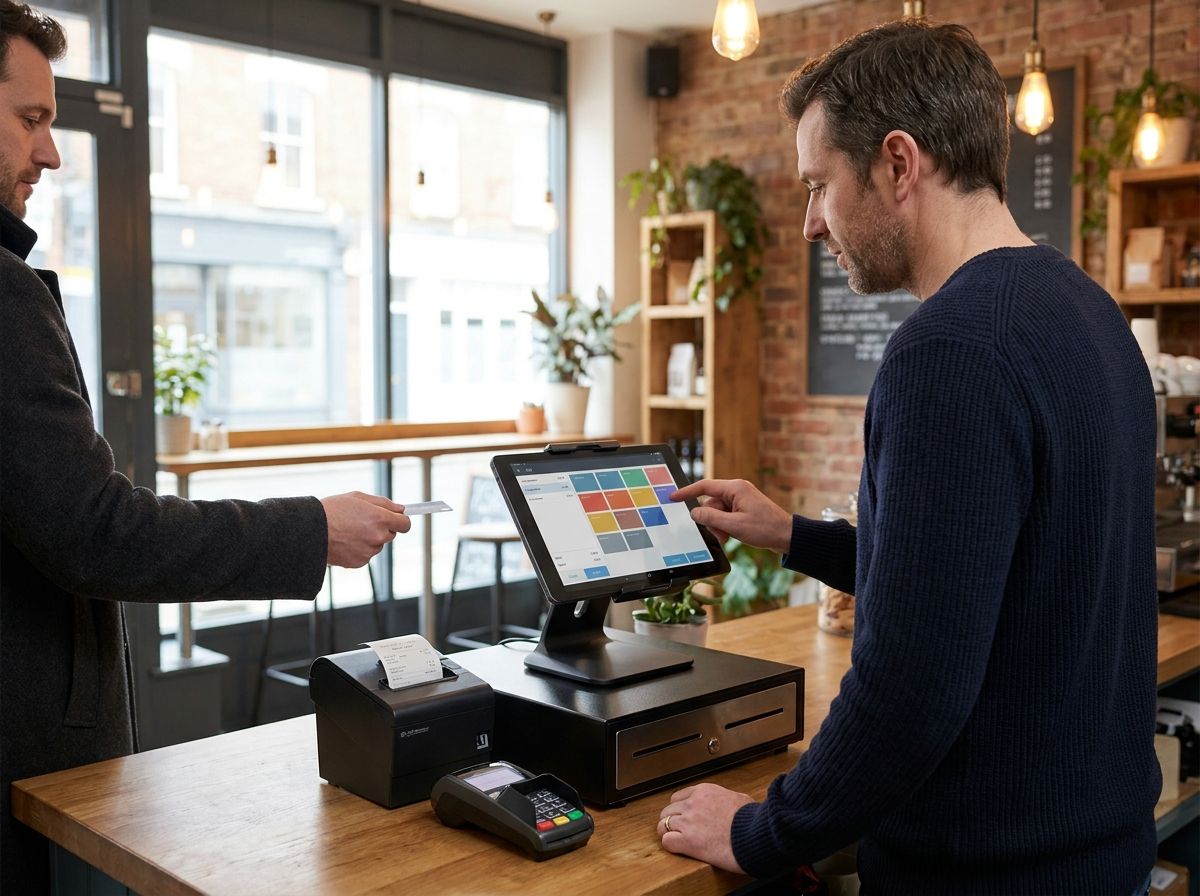
An ipad pos system turns a regular Apple tablet into a full till, using an app for the software, a stand or case to hold it, and separate hardware for taking payments and printing receipts. It’s usually cheaper to start with than a dedicated terminal since you’re often only buying the accessories rather than proprietary hardware, but it comes with real trade-offs around battery life, durability and what happens if a provider stops supporting iPad down the line.
This guide covers which UK providers actually run on iPad, what hardware you’ll need to build a working setup, how these systems behave when the Wi-Fi drops, iPadOS version requirements to check before you buy, and an honest look at the drawbacks that vendor marketing tends to skip over.
Which UK Providers Run on iPad?
Several of the UK’s most established EPOS providers offer a dedicated iPad app rather than requiring proprietary hardware, and the split between iPad-only and cross-platform providers is worth understanding before you shortlist anyone.
Square and PayPal POS (formerly Zettle) both run on iPad and Android, giving you flexibility if you’re not committed to Apple hardware specifically. Lightspeed Retail and Lightspeed Restaurant are built primarily around the iPad app, though Lightspeed Retail’s backend and till can also run from a desktop browser if you’d rather not be tied to a tablet. Epos Now offers an iPad POS option alongside its standard hardware bundles, giving buyers a genuine choice between a proprietary terminal and a tablet-based setup. Shopify POS runs on iPad and is the natural choice if your business already sells through a Shopify online store, since stock and orders sync directly between the two.
TouchBistro is worth a specific mention for hospitality, since it runs exclusively on iPad rather than offering an Android alternative, which suits restaurants happy to commit to Apple’s ecosystem but limits flexibility if you’d rather keep options open. Before committing to any provider, check whether “iPad POS” refers to a full offline-capable till app or a lighter companion app to a separate terminal, since the two are marketed under very similar language but behave quite differently in practice.
Hardware You Need for an EPOS iPad System
A tablet alone isn’t a working till. Building a proper epos ipad setup means adding a handful of specific pieces of hardware, and costs vary a fair amount depending on what you already own.
A stand or mount: this holds the iPad securely on the counter, often at an angle that lets you swivel it towards the customer for payment confirmation. Square’s own stand launched in the UK at £99 plus VAT for the current generation, though pricing changes fairly often so it’s worth checking the current figure directly before buying. Cheaper third-party stands exist too, generally without the built-in card reader that Square’s own version includes.
A cash drawer: needed if you take cash at all, and these typically connect to your receipt printer rather than directly to the iPad, opening automatically when a cash sale completes. Basic drawers start from around £50 to £80 depending on size and build quality.
A receipt printer: most providers support USB, Bluetooth or network-connected thermal printers from established brands like Star Micronics or Epson, with prices typically running £100 to £200 for a reliable model. Some combined printer-and-cash-drawer units exist too, which can work out cheaper than buying each separately.
A card reader: unless you’re using an all-in-one stand with a built-in reader, you’ll need a separate contactless card reader that pairs with the iPad over Bluetooth. Most UK providers sell their own reader for somewhere between £19 and £49, and it’s generally tied to using that provider’s own payment processing.
Altogether, a basic iPad POS setup with stand, printer, cash drawer and card reader typically runs somewhere between £250 and £500 in one-off hardware costs, on top of whatever you pay for the iPad itself if you don’t already own a suitable one.
iPadOS Version Requirements to Check Before You Buy
POS apps update regularly, and providers periodically drop support for older iPadOS versions to take advantage of newer software features, which matters if you’re planning to use an iPad you already own rather than buying a new one specifically. Most major providers currently require a reasonably recent iPadOS version, commonly iPadOS 15 or later, though this changes as apps update, so always check the current minimum requirement on the App Store listing for your specific provider before assuming an older iPad will work.
Older iPad models can also fall outside Apple’s own supported update list entirely, meaning they’ll never receive the newer iPadOS versions a POS app might eventually require, even if the current version still works fine. If you’re planning to use existing hardware rather than buying new, check your iPad’s model and current iPadOS version against the provider’s stated minimum before you commit, since discovering an incompatibility after setup wastes real time.
What Happens When Wi-Fi Drops: Offline Behaviour on iPad POS
Most cloud-based iPad POS systems include some form of offline mode, but the details differ enough between providers that it’s worth understanding exactly what “offline” means for your shortlisted system rather than assuming it works the same way everywhere.
Square, for example, allows offline card and cash payments when your device loses its internet connection, whether through a Wi-Fi outage or a mobile data drop, according to Square’s own UK support documentation. Payments taken offline are held on the device and processed automatically once you reconnect, but you need to reconnect within 24 hours to keep accepting new offline payments, and any pending offline transaction expires and can’t be recovered if you haven’t reconnected within 72 hours. Tap payments using digital wallets like Apple Pay or Google Pay work offline, but tapping a physical contactless card doesn’t, which is an easy detail to miss until it actually happens mid-service.
Other providers vary in how much functionality survives an outage. Some let you keep taking sales but pause features like real-time multi-location stock visibility until the connection returns, while others are more limited. If reliable offline capability matters for your venue, particularly relevant for older buildings with patchy Wi-Fi, ask each shortlisted provider directly what specifically continues working, what pauses, and how long you have to reconnect before anything is lost.
Total Cost: iPad Setup vs a Dedicated POS Terminal
The upfront maths generally favours an iPad-based system if you’re starting from nothing, but the full picture is more nuanced once you account for what a dedicated terminal includes by default.
A basic tablet setup (iPad, stand, printer, cash drawer, card reader) typically costs somewhere between £250 and £700 all in, depending on whether you already own a suitable iPad and how much hardware you add. A dedicated POS terminal, by contrast, usually bundles the screen, payment hardware and sometimes a printer into a single purpose-built unit, often priced from around £400 upwards, but with everything already integrated and tested to work together out of the box.
Where the comparison shifts is durability and lifespan. A dedicated terminal is generally built to withstand commercial use over several years without needing replacement, while a consumer iPad wasn’t designed with that in mind, and its resale or trade-in value drops steadily as Apple releases newer models. If your iPad needs replacing in three or four years while a dedicated terminal might run for six or seven, the apparent upfront saving of the tablet route narrows considerably over that longer timeframe. Prices change often across this whole market, so it’s worth pricing out both routes with current figures for your specific shortlist rather than relying on general ranges like these.
Tablet EPOS UK: The Honest Drawbacks
Most comparison guides focus heavily on the upsides of tablet EPOS UK setups, cost, flexibility, familiar hardware, without spending much time on the practical downsides that only become obvious once a system is actually running your daily service.
Battery Life
An iPad running a POS app continuously through a full trading day, with the screen active and Bluetooth connected to a card reader and printer, drains noticeably faster than typical everyday use. Most venues plug the iPad in permanently via a powered stand to avoid this becoming an issue, but that’s a design decision you need to plan for from the start rather than discovering mid-shift that your unplugged backup tablet won’t survive a busy Saturday.
Screen Durability in Kitchens and Bars
Consumer iPads aren’t built to commercial ingress protection standards, and a standard glass screen is vulnerable to grease, spills, and the general knocks of a busy kitchen or bar environment in a way a purpose-built terminal’s toughened screen typically isn’t. A protective case and screen cover help, but they add bulk and cost, and neither fully replicates the resilience of hardware designed from the outset for commercial hospitality use.
The Risk of a Provider Dropping iPad Support
This is the drawback vendor marketing pages almost never mention, but it’s a genuine risk worth factoring into any long-term decision. Vend, once a well-regarded independent iPad-based retail POS provider, was acquired by Lightspeed in 2021, and existing Vend customers have since been gradually migrated onto Lightspeed’s own platform rather than continuing on the original product. This kind of consolidation happens periodically across the EPOS market, and a provider being acquired, discontinued, or simply deprioritising iPad in favour of Android or proprietary hardware can force an unplanned system change with real retraining and migration costs. Before committing, it’s worth checking how long a provider has supported iPad, whether they’ve announced any platform changes, and how straightforward their data export process is if you ever need to switch.
FAQs
Can I run a POS system on any iPad?
Not necessarily, since POS apps have minimum iPadOS version requirements that change as software updates, and older iPad models eventually fall outside Apple’s own supported update list entirely. Check your specific iPad model and current iPadOS version against a provider’s stated minimum requirement before assuming it will work.
Which UK POS providers work on iPad?
Square, PayPal POS, Lightspeed Retail, Lightspeed Restaurant, Epos Now, Shopify POS and TouchBistro all offer a dedicated iPad app in the UK. Some, like TouchBistro, run exclusively on iPad, while others like Square also support Android for businesses that want cross-platform flexibility.
What hardware do I need for an iPad POS system?
At minimum, you need a stand or mount, a card reader, and usually a receipt printer, with a cash drawer added if you take cash payments. A basic complete setup typically costs between £250 and £700 depending on what hardware you already own.
Does an iPad POS system work without Wi-Fi?
Most providers offer some offline mode, letting you continue taking card and cash payments during a connectivity drop, though the specifics vary. Square, for example, allows offline payments for up to 24 hours before you need to reconnect, with pending offline transactions expiring after 72 hours if you don’t.
Is an iPad POS system cheaper than a dedicated terminal?
Usually cheaper upfront, typically £250 to £700 for a tablet setup versus £400 upwards for a dedicated terminal, but the comparison narrows over time since consumer iPads generally have a shorter commercial lifespan than purpose-built hardware. Factor in replacement costs over three to five years rather than comparing only the initial purchase price.
Is an iPad durable enough for a busy kitchen or bar?
A standard consumer iPad isn’t built to the same ingress protection standard as dedicated commercial hardware, making it more vulnerable to grease, spills and knocks. A protective case and screen cover help but don’t fully close the gap, so venues with particularly demanding conditions should weigh this against the cost saving.
What happens if my POS provider stops supporting iPad?
This has happened before in the UK market, most notably when Lightspeed acquired Vend in 2021 and began migrating its iPad-based customers onto its own platform over time. Check a provider’s platform history and data export options before committing long-term, since an unplanned system change carries real retraining and migration costs.